
Your recipient should not be the first person to discover that a button goes somewhere wrong. A neat email can still create a bad moment when its "View details" link lands on an old page, a product image returns an error, or a short tracking URL takes an unexpected route.
Start by treating the links in an email as a small delivery list of their own. Check the destination, the redirect path, and the role of each URL before you send. Then read the email as a recipient would. A network response can tell you that an address answered; it cannot tell you that the page is the right page for this message.
Why a visual scan is not enough
Most senders do a quick click-through in a draft. That catches obvious typos, but it can miss a redirect that changes the destination, an image URL that serves a web page instead of an image, or a link that behaves differently outside your logged-in browser.
The useful question is not "Did the button open for me?" It is "What URL will a recipient reach, and is that the exact place I meant to send them?"
Make a short list before you test
List every URL that carries meaning in the email:
- Main buttons and text links.
- Booking, payment, download, or account pages.
- Social links if they are part of the message.
- Linked images and logo images.
- A visible unsubscribe link when the email is marketing.
Do not forget a link because it looks decorative. A logo that doubles as a home-page link is still a destination a recipient may use.
Check the response and the final destination
An email link check is most useful when it tells you more than pass or fail. Look for the first HTTP response, the final response, the number of redirects, and the final URL. A clean redirect from http to https may be expected. A redirect from a campaign page to an unrelated home page deserves a closer look.
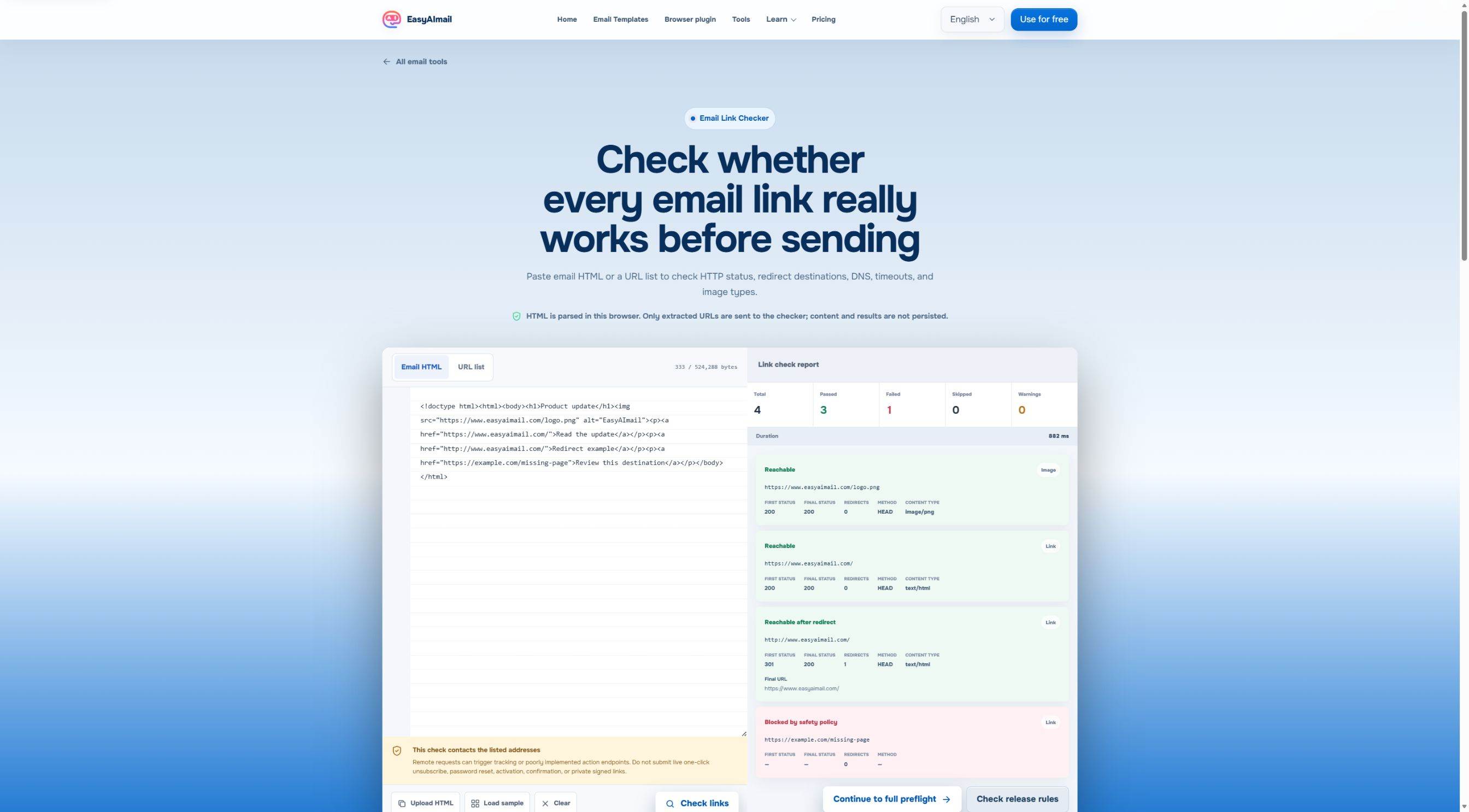
In this English-interface test, the built-in sample checked 4 addresses: 3 passed and 1 was blocked by the safety policy. The visible report showed a public image returning 200 with image/png, a site returning 200, and an HTTP address reaching an HTTPS destination after one redirect. That is useful evidence about the route, not proof that every sentence or offer on the page is correct.
Read redirects as a story, not a number
One redirect is not automatically a problem. What matters is whether the route still makes sense to the recipient. If an email promises an appointment page, the final URL should still be the appointment page, not a generic sign-in screen or an expired preview.
Check images as resources, not only as decoration
For a linked image, a recognizable image response type is a helpful signal. It does not confirm that the image is the right crop, contains the right words, or suits dark mode. Open the final email preview and judge that separately.
Keep sensitive action links out of a network checker
Some URLs do more than display a page. A one-click unsubscribe, password reset, activation, confirmation, or private signed URL can trigger a real action or expose information when it is requested. Do not submit those live addresses to a checker that contacts URLs.
Instead, inspect the link structure in a safe draft, use a test-specific destination when your system provides one, or review the production link manually under the appropriate account controls. The goal is to protect the recipient's action, not merely to get a green result.
A passing status is not send approval
HTTP status does not know whether the page is current, whether the offer is still available, or whether the destination matches the words around the button. It also cannot prove that a recipient has access to a gated page.
After a link passes, check the visible label, the surrounding promise, the destination page title, and any dates, prices, names, or availability claims. For a broader reading check, use the HTML Email Accessibility Checklist. A destination can work perfectly while the link text still leaves a reader guessing.
Put link checks in the right pre-send order
For a consequential email, a calm sequence is usually enough:
- Freeze the copy and the URLs you intend to send.
- Check public, non-sensitive links and note redirects.
- Read the final destination and the email together.
- Check the HTML itself for size, compatibility, and missing content.
- Send a real test when the recipient or outcome matters.
The last two steps matter because a working URL is only one part of a complete email. Gmail Clipping at 102 KB explains why the final HTML source needs its own review as well.
Where EasyAImail fits after the check
The free link checker is for a finished HTML email that needs a focused URL review. If you still need to write the email itself, EasyAImail can help you explain the situation, review recommended templates, choose the one you prefer, fill in only the missing details, and preview a complete HTML email. You still review the links and decide whether to send.
That division is deliberate. A tool can make the final review easier, but it should not make a customer-facing decision for you.
FAQ
Does a 200 response mean the link is safe to send?
No. It means the checked address responded successfully. Confirm that the final page, access level, copy, and timing are right for this recipient.
Why can a link be blocked instead of reported as a normal failure?
A checker may refuse addresses that resemble sensitive actions, private infrastructure, or unsafe destinations. Treat that as a boundary, not as permission to bypass it with a live customer link.
Should I test unsubscribe links this way?
Do not submit a live one-click unsubscribe link to a network checker. Confirm the correct setup through your sending platform and use safe testing procedures.
Finish with a human review
Before you send it, check that each visible promise leads to the page you meant, each image still makes sense if it fails to load, and no sensitive action URL was exposed during testing. A link checker can catch a route problem early. The final judgment is still yours.
 Get the Edge extension
 Get the Firefox extension