
The most awkward pre-send error is a polished email that still says {{first_name}}. It is not always a dramatic bug. It might be a staging link hidden in a button, an image with no useful alternative text, or a marketing email whose final version lost its unsubscribe destination during an edit.
Start by assuming that a finished-looking email can still contain unfinished release details. Do a short, deliberate review of variables, destinations, tracking, and the message type before you hand it off or press send. That is different from checking whether the writing sounds good, and it is different from promising compliance or inbox placement.
What a release review is actually for
A release review looks for pieces that were meant to change before a recipient saw them. A variable is only helpful while it is a variable. Once the email is addressed to a real person, {{first_name}}, [Company], or a temporary campaign label should be either resolved or intentionally removed.
The same idea applies to test environments and draft destinations. A page can work perfectly and still be the wrong page because it belongs to staging, preview, or a temporary workflow.
Look for placeholders where people notice them first
Check the subject, preheader, greeting, headline, main button, image alt text, footer, and signature. Do not limit the search to the first paragraph. Placeholders often survive in the text under a button or in a footer copied from a previous campaign.
If a value is intentionally blank, make that choice visible in the final copy. Leaving a token in place and hoping a sending platform will resolve it is not a review strategy.
Test domains are not harmless just because they load
Words such as staging, dev, qa, sandbox, and preview are useful during production. They are also a warning sign when they appear in a customer-facing link. The recipient may see an unfinished page, a login prompt, or a version of the content you did not mean to share.
Make a small allowed-domain list for the email before sending. A campaign may legitimately use more than one domain, but each should have a reason that someone reviewing the email can explain.
Check the visible promise against the destination
Do not only scan the URL. Read the button text, the surrounding sentence, and the page it opens together. "Download your guide" should not lead to a generic homepage simply because the homepage is available.
Keep a staging fix simple
When a staging URL appears, replace it with the approved production destination and rerun the review. Do not patch the link in only one version while leaving the same destination in an image, footer, or alternate language version.
Treat UTM consistency as a handoff detail
Tracking parameters are not the emotional core of an email, but missing or inconsistent values can make later reporting confusing. Decide which fields your team expects, then check that comparable campaign links follow the same rule.
This does not mean every link must have identical parameters. A social profile, a support page, and a campaign CTA may play different roles. The point is to know which links are intended to be measured and to avoid accidental variation.
Marketing and transactional email need different checks
Choose the email type before you review. A marketing email has a different expectation around an unsubscribe destination than a transactional receipt or account notice. Do not add a pretend unsubscribe link to a transactional email merely to satisfy a checklist, and do not treat a promotional message as transactional to avoid a necessary review.
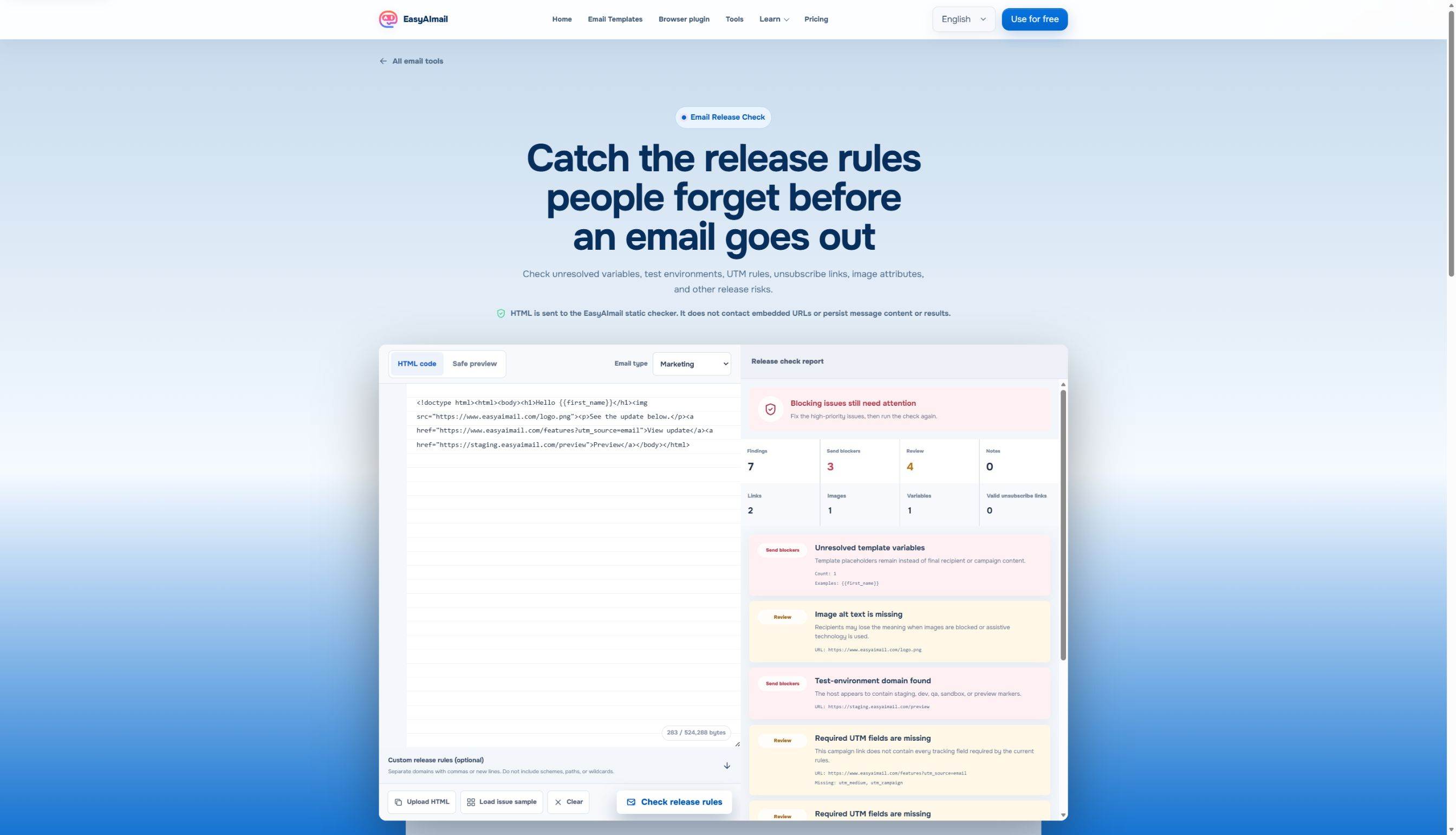
In this English-interface test, the marketing sample returned 7 findings, including 3 send blockers. The visible report identified an unresolved {{first_name}}, missing image alt text, a staging domain, missing or inconsistent UTM fields, and no usable unsubscribe link. It is a good reminder that one short sample can contain several kinds of unfinished work.
Know what a static check cannot tell you
A rules check can inspect what is present in the supplied HTML. It cannot prove that an email will be delivered, meet every legal requirement, or render identically in every inbox. It also does not replace a real test of the page a recipient will see.
For the visual and readable parts of your final pass, the HTML Email Accessibility Checklist is a useful companion. For the separate question of source size and Gmail clipping, read Gmail Clipping at 102 KB.
Make the final review part of the writing workflow
The easiest release review starts before the last minute. Keep names, offers, dates, and URLs in a clear source of truth. When the email is generated or revised, compare the finished result with that source rather than relying on memory.
EasyAImail can help earlier in the process by turning a real sending situation into a complete email: it recommends relevant templates, you choose the template, it asks for the missing details, and you review the result before deciding whether to send. A release check then has a much cleaner job: verify the final facts and destinations, not guess what you meant.
FAQ
Are unresolved merge tags always a send blocker?
If a recipient can see a placeholder where a name, company, date, or other real content should be, treat it as a blocker. An intentionally empty optional field is different, but it should not leave token syntax behind.
Does a clean rules report mean the email is compliant?
No. It is a focused static review. Confirm applicable requirements, recipient expectations, delivery settings, and real inbox behavior separately.
Should every email include UTM parameters and an unsubscribe link?
No. The right requirements depend on the message type and your sending context. Be explicit about the type before reviewing instead of using one checklist for everything.
Give the finished email one last factual pass
Before you send it, check the greeting, the final URLs, the environment names, the intended tracking fields, the image text, and the requirements that actually apply to this kind of email. That quiet last pass protects the work you already put into the message.
 Get the Edge extension
 Get the Firefox extension