
Making an image file smaller does not automatically make Gmail less likely to clip your email. The important distinction is where the image lives. A normally hosted image can be large on its server while its short URL adds very little to the email source. A base64 or data-URI image puts the image data inside the HTML itself, so those bytes travel with the source that Gmail evaluates.
Start by measuring the final HTML, not by guessing from the visible weight of an image. Then separate remote image files from embedded image data before deciding what to change.
The short answer
An external image file does not normally become part of the HTML source simply because the email contains an <img> tag. The image URL, attributes, and surrounding markup do count. The image file is fetched separately by the recipient's email client.
A base64 image is different. Its data is written into the src attribute itself. That makes the source much larger, even when the message contains only a few visible lines of copy.
Think in terms of the final source, not the visual page
An HTML email can look simple while carrying a surprising amount of source. Repeated inline styles, tracking parameters, hidden fallback markup, copied modules, comments, and embedded images all add bytes. Conversely, a large hosted photograph may make the email slower to load without adding much to the HTML-size calculation.
That is why "my image is 800 KB" and "my email HTML is 105 KB" are different facts. Both can matter to the recipient experience, but they call for different fixes.
External images: their URL counts, not their whole file
For a typical image tag such as:
<img src="https://images.example.com/winter-card.png" alt="A winter card">the HTML contains the tag, the URL, and the attributes. It does not contain the actual PNG or JPEG bytes. Optimizing the hosted image may still improve loading time, mobile data use, and visual quality, but it does not automatically shrink the source by the same amount.
Why URL length can still matter
Long asset paths, large tracking strings, and repeated copies of the same URL still consume source bytes. This is usually a small effect compared with a data URI, but it is part of the final calculation.
Why remote images are not a free pass
Hosted images can be blocked, load slowly, expire, or serve the wrong content type. Keep useful alt text and test the final email. Size is only one pre-send risk.
Embedded base64 images: the image data counts
The following pattern embeds image data inside the email:
<img src="data:image/png;base64,iVBORw0..." alt="Offer details">Those characters are part of the HTML source. A base64 payload can push an otherwise short email into Gmail's clipping-risk range very quickly. It may be tempting because there is no separate image request, but it is usually a poor default for a message that needs to remain compact and broadly compatible.
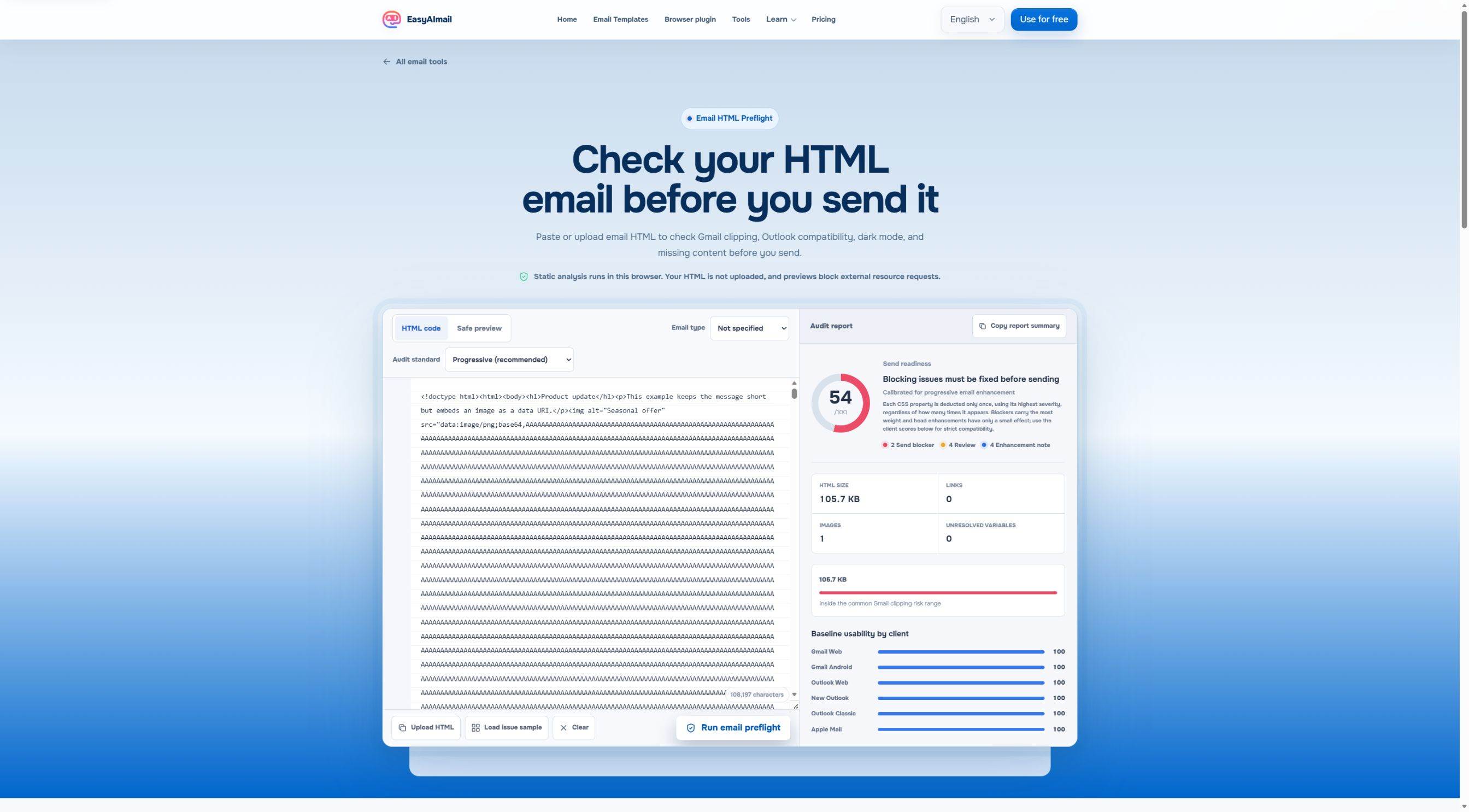
In this English-interface test, the embedded-image sample measured 105.7 KB and was marked in the common Gmail clipping risk range. The sample was intentionally short except for a synthetic data-URI image. That visible result is the useful lesson: the image was not merely displayed by the email; its data had become part of the HTML being measured.
Compressing an image can help, but ask what it solves
If the image is externally hosted, compress it for faster loading and a better recipient experience. Do not assume that compression alone will fix a Gmail clipping warning. First find out whether the HTML itself is too large.
If the image is base64-embedded, moving it to a reliable hosted URL can reduce source size dramatically. Review the delivery and privacy requirements of your own image hosting before making that change.
Do not delete Outlook support just to get under a number
When you do need to reduce HTML, avoid removing table structures, conditional comments, or fallback styles simply because they look old or verbose. Some of that code may keep the message readable in restrictive clients.
Outlook HTML Email CSS Support explains why some older-looking structures still protect the message in restrictive clients. For the wider Gmail question, see Gmail Clipping at 102 KB.
Measure the version that will actually be sent
Check after your sending platform has added tracking, merge content, or any footer it applies. The source you preview in an editor may not be identical to the source delivered to Gmail. If the email is important, send a controlled test to a real inbox after the static review.
An HTML preflight can surface the byte count and adjacent risks such as missing alt text or unresolved variables. It is risk analysis, not a promise that every Gmail account will behave the same way.
Where EasyAImail fits
EasyAImail's free HTML preflight is useful when you already have HTML and need a focused check before inbox testing. If you are still composing the message, the web app or browser plugin can help you explain the situation, review recommended templates, choose the visual direction yourself, fill in missing facts, and preview a complete email before you decide whether to send.
The point is not to generate more markup for its own sake. It is to make sure the complete email still represents the person sending it.
FAQ
Do image dimensions count toward Gmail's 102 KB limit?
Dimensions written in HTML are only a few characters. The key question is whether image data is embedded in the source or loaded from a separate URL.
Will an external 2 MB image cause Gmail clipping?
Its file size does not normally add 2 MB to the HTML source. It can still harm loading time and the recipient experience, so optimize it for those reasons.
Is 102 KB an exact guarantee?
Treat it as a practical risk threshold for the final HTML, not a substitute for testing the delivered version. Measurement and a real inbox test are safer than relying on a rough estimate.
Use the right measurement for the right problem
Before you send it, check the HTML bytes of the final version, whether any image data is embedded, whether hosted images still load and have alt text, and whether your compatibility code is carrying essential meaning. That gives you a much clearer next step than compressing every image on instinct.
 Get the Edge extension
 Get the Firefox extension