
“Email tool” sounds like one product category, but the tools often solve different jobs. You may simply need an inbox to receive and reply. You may want help making a paragraph clearer. You may need to send a campaign to thousands of subscribers. Or you may be stuck on one message to a client, coworker, or partner that needs both the right words and a more considered presentation.
That is why EasyAImail is not best understood as “better than every other email tool.” The more useful question is: what kind of email work are you trying to finish?
Four tool categories, four different jobs
| Tool category | Best for | Not its main job |
|---|---|---|
| Regular inbox | Receiving, replying, searching, and filing daily email | Helping you think through a difficult message or design its presentation |
| General AI writing tool | Drafting, rewriting, and testing a tone | Template choice, email layout, and an in-product pre-send workflow |
| Marketing email platform | Subscriber management, campaigns, and automation | The wording of a one-to-one relationship at a particular moment |
| EasyAImail | Turning an interpersonal email intention into a previewable HTML email | CRM, complex approvals, brand governance, or high-volume marketing automation |
There can be overlap between these categories. Overlap is not the same as replacement. When the tool does not fit, the usual problem is not a missing feature; it is that you have to rebuild the workflow by hand at every step.
When a regular inbox is enough
If you know exactly what to say and the reply is only a few lines, writing it in your inbox is often fastest. A regular mailbox is already built for sending, receiving, search, threads, and archives.
What it may not help with is the moment before you know what to say: following up on an unpaid invoice without damaging the relationship, explaining a delay without sounding evasive, thanking a professor after years of no contact, or writing a sincere interview follow-up. In those situations, the hard part is not finding a Send button. It is working out the message itself.
General AI can help with wording, but it may not finish the email workflow
A general AI tool can be excellent for drafting, shortening, rewriting, or trying a more polite tone. You can ask for a revision, then paste it into your inbox. That is flexible and entirely sensible when you already know the content and presentation you need.
The copy-and-paste route can also split the work apart: discuss the draft in one place, then handle the subject line, greeting, signature, and final formatting somewhere else. Add images, buttons, or a more finished visual presentation, and there may be more layout work waiting for you. For plain text, that trade-off is often fine. For an email that represents you, it can add steps back in.
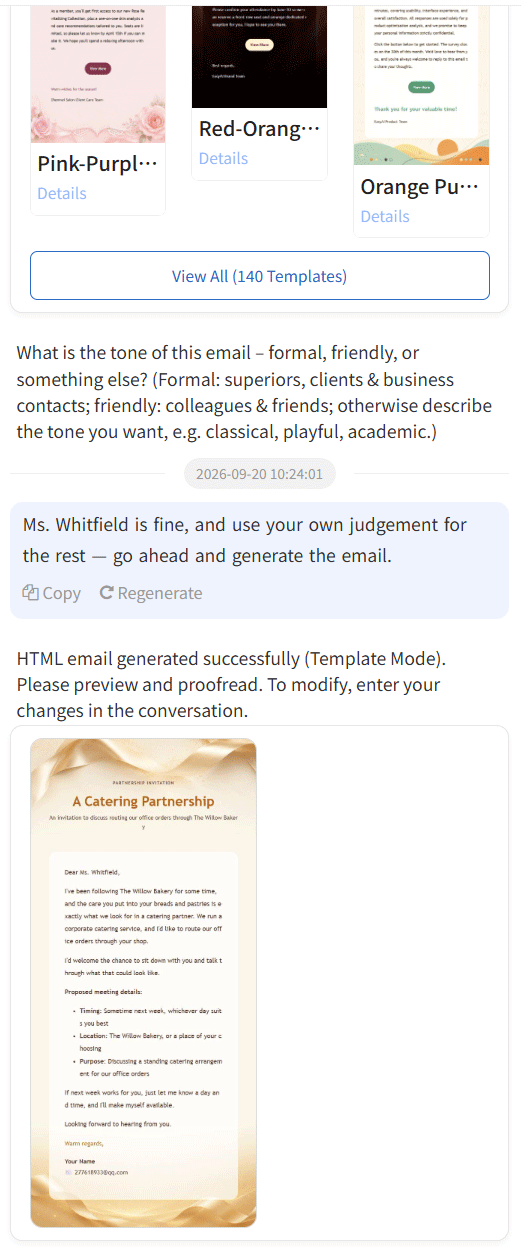
EasyAImail does not decide what you should say for you. It starts from a natural request and asks for the recipient, relationship, facts, and tone. The AI can recommend templates, but you review the details and choose the template yourself before it generates a checkable HTML email.
Marketing email platforms solve for scale, not every personal message
Marketing platforms are usually built around lists, segments, subscription status, campaign automation, reporting, and bulk delivery. Those capabilities matter for newsletters, product announcements, promotions, and lifecycle programs.
But if the recipient is a customer waiting for a quote, a new partner, a coworker going through a difficult time, or someone you want to thank properly, the question is rarely how to reach a thousand people. It is how to say the right thing within one specific relationship. Forcing a one-to-one message into a bulk-marketing workflow can make the preparation heavier than the email itself.
That is not a criticism of marketing tools. It is a reminder to start with the relationship. Campaigns, subscriptions, and conversion are their strength. Clear wording, a natural greeting, an appropriate visual format, and a deliberate final review are a different kind of work.
The EasyAImail workflow: clarify the intention, then complete the email
EasyAImail is for that second kind of work. You can start with an unfinished but real request, such as: “A customer wants a refund before delivery. I want to acknowledge her concern and explain the current shipping status.” The product recommends relevant templates. You can open the details, review the tags, colors, description, and sample content, and decide whether to use one.
After you choose a template, the AI asks for the information the email still needs: the recipient’s name, your relationship, dates, specific facts, and the tone you want. It generates only after the needed details are in place. You still review the facts, salutation, links, signature, and preview. Sending remains a separate, explicit action.
This is useful when you cannot simply “get the words out”: a customer follow-up that needs tact, a time-sensitive notice, a holiday greeting, or a thank-you and condolence note that should feel genuinely considered.
When EasyAImail is not the right tool
Clear boundaries make a tool easier to choose. Use another system first when:
- your company already has controlled templates, approval steps, and compliance requirements;
- you need subscriber management, unsubscribe handling, segmentation, or large-scale marketing automation;
- the email contains legal advice, sensitive people decisions, or material that requires professional review; or
- you only need to reply with a clear sentence and writing it directly is faster.
EasyAImail is not trying to replace your inbox, CRM, or marketing platform. It belongs in the part of the process where you know the message matters but have not yet worked out how to say it and present it.
Do not start with a feature checklist
A better order of questions is: is this one-to-one or bulk? Is the difficulty the content, the relationship, the layout, or the automation? Who needs to take responsibility for the final email?
If the answer is “one message that represents me to a specific person, and I need to review it before it goes out,” try EasyAImail. Start with the real intention, review and choose a template, fill in the details gradually, then inspect the preview. If the work is really about subscriptions, company approval, or a one-line reply, a more specialized tool will usually be simpler.
> The situations in this article illustrate different workflows. All people and email content are fictional examples.